Transcoding configuration
About transcoding
Storage space is the main constraint of this project. To keep storage usage as low as possible, we benchmarked several transcoding configurations and selected the one offering the best compromise between file size, encoding time, and compatibility.
Transcoding configuration
Uploaded videos are transcoded into an HLS ladder with up to three quality levels:
- 480p
- 720p
- 1080p
There is also a 240p-only profile for sources between 240p and 479p. Sources below 240p are rejected. For a source at 480p or above, the backend selects only the 480p, 720p and 1080p profiles which fit, so it never upscales a video.
Each backend process can claim durable transcode jobs from PostgreSQL and launches ffprobe and FFmpeg as supervised child processes. The current output is H.264, CRF 24, veryfast, yuv420p, with six-second HLS VOD segments. Audio is AAC at 128 kbit/s when the source contains audio.
This is an in-process runner, not a separate worker service. Its complete download, probe, encode, upload, verification and publication cycle is bounded by VIDEO_TRANSCODE_MAX_CONCURRENT_JOBS. VIDEO_TRANSCODE_THREADS_PER_JOB separately limits FFmpeg threads.
Benchmark
A benchmark was run to compare different codecs and FFmpeg presets.
Setup
- 2 different YouTube videos (~35 min and ~25 min)
- Each video was transcoded into a complete HLS ladder
- 9 different encoding configurations were tested
Tested configurations
- AV1 CRF30 preset4
- H.264 CRF22 veryfast
- H.264 CRF22 fast
- H.264 CRF22 medium
- H.264 CRF22 slow
- H.264 CRF24 veryfast
- H.264 CRF24 fast
- H.264 CRF24 medium
- H.264 CRF24 slow
Results
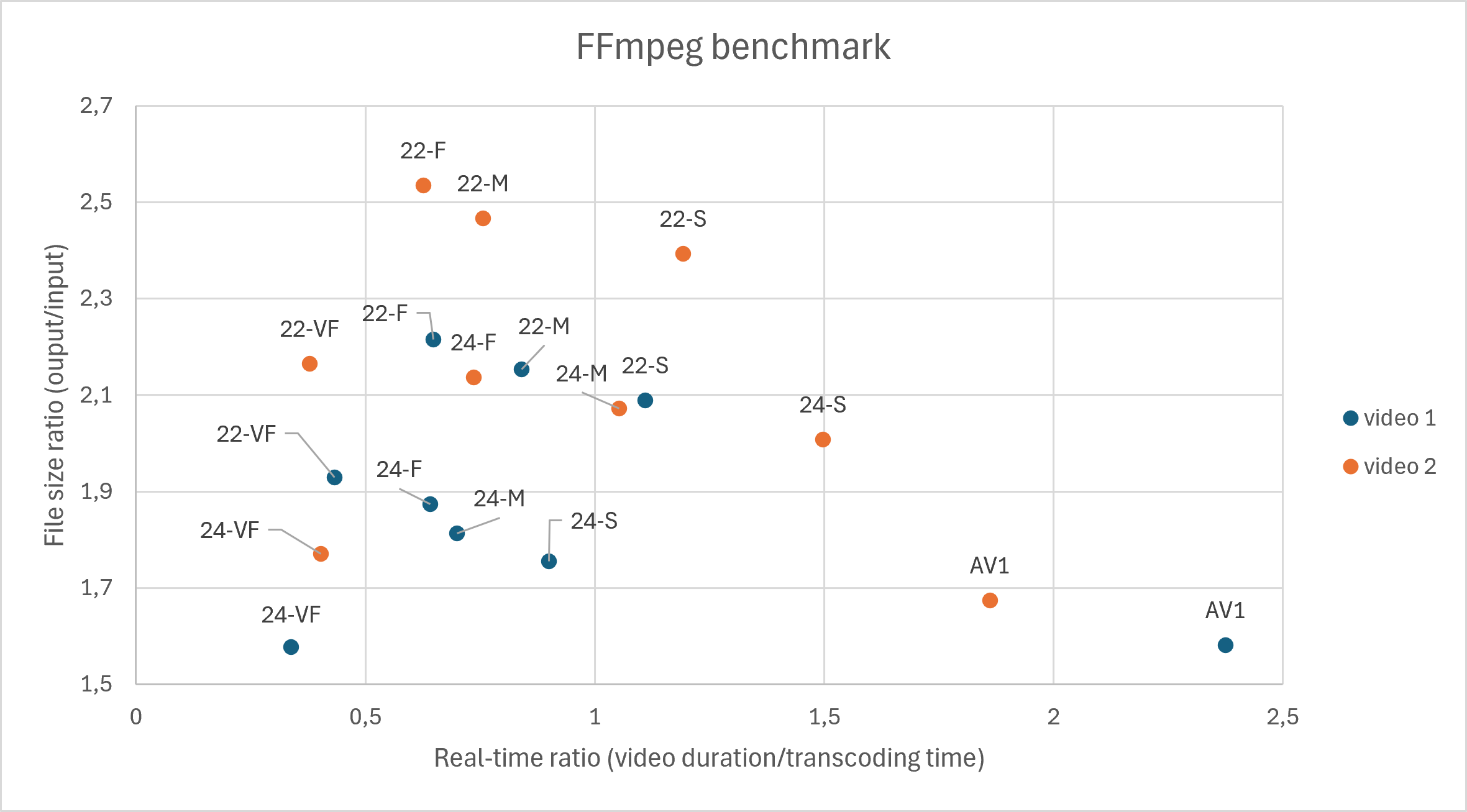
This benchmark was performed on only two videos. It was useful for choosing a first configuration, but it should not be treated as a broad quality study.
The benchmark quickly highlights the two most interesting configurations in terms of storage efficiency:
- AV1 CRF30 preset4
- H.264 CRF24 veryfast
Analysis
The results were somewhat surprising.
AV1 and H.264 CRF24 veryfast produce very similar output sizes, while AV1 takes significantly longer to encode.
VMAF scores
| Resolution | AV1 | H.264 |
|---|---|---|
| 480p | 98 | 90 |
| 720p | 99 | 97 |
| 1080p | 99 | 99 |
At 480p, AV1 clearly preserves more visual quality than H.264, with a VMAF score of 98 compared to 90.
For 720p and 1080p, the difference becomes negligible, making H.264 a much more attractive option considering its encoding speed.
Finally, AV1 is still not supported on all devices. Older Apple devices (before 2023) and many older smartphones or TVs cannot decode AV1 in hardware, making H.264 the safest choice for compatibility.